
txtai – neuml
💡 语义搜索、LLM编排与语言模型工作流的一体化AI框架
关键指标一览
主题标签
README 详细介绍

All-in-one AI framework






txtai is an all-in-one AI framework for semantic search, LLM orchestration and language model workflows.
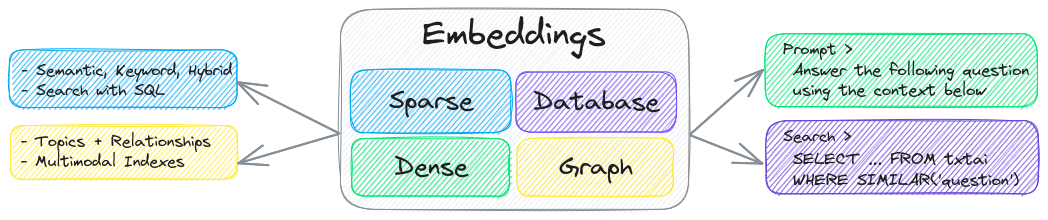
The key component of txtai is an embeddings database, which is a union of vector indexes (sparse and dense), graph networks and relational databases.
This foundation enables vector search and/or serves as a powerful knowledge source for large language model (LLM) applications.
Build autonomous agents, retrieval augmented generation (RAG) processes, multi-model workflows and more.
Summary of txtai features:
- 🔎 Vector search with SQL, object storage, topic modeling, graph analysis and multimodal indexing
- 📄 Create embeddings for text, documents, audio, images and video
- 💡 Pipelines powered by language models that run LLM prompts, question-answering, labeling, transcription, translation, summarization and more
- ↪️️ Workflows to join pipelines together and aggregate business logic. txtai processes can be simple microservices or multi-model workflows.
- 🤖 Agents that intelligently connect embeddings, pipelines, workflows and other agents together to autonomously solve complex problems
- ⚙️ Web and Model Context Protocol (MCP) APIs. Bindings available for JavaScript, Java, Rust and Go.
- 🔋 Batteries included with defaults to get up and running fast
- ☁️ Run local or scale out with container orchestration
txtai is built with Python 3.10+, Hugging Face Transformers, Sentence Transformers and FastAPI. txtai is open-source under an Apache 2.0 license.
> [!NOTE]
>
> NeuML is the company behind txtai and we provide AI consulting services around our stack. Schedule a meeting or send a message to learn more.
>
> We're also building an easy and secure way to run hosted txtai applications with txtai.cloud.
Why txtai?
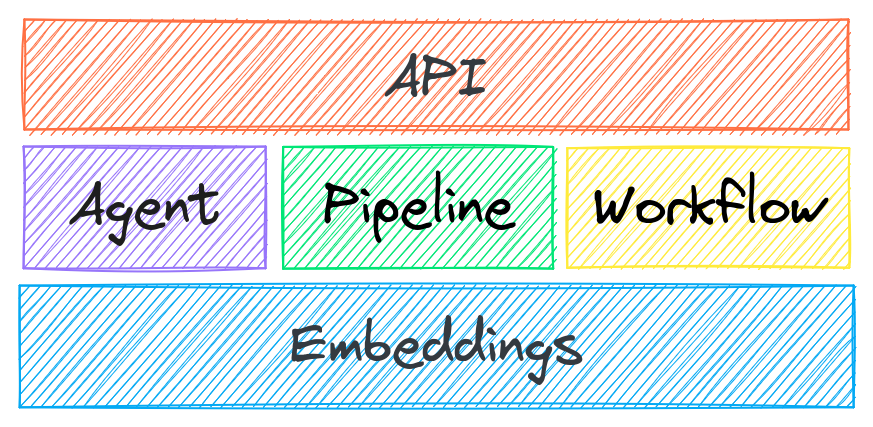
New vector databases, LLM frameworks and everything in between are sprouting up daily. Why build with txtai?
# Get started in a couple lines
import txtai

embeddings = txtai.Embeddings()
embeddings.index(["Correct", "Not what we hoped"])
embeddings.search("positive", 1)
#[(0, 0.29862046241760254)]- Built-in API makes it easy to develop applications using your programming language of choice
# app.yml
embeddings:
    path: sentence-transformers/all-MiniLM-L6-v2
CONFIG=app.yml uvicorn "txtai.api:app"
curl -X GET "http://localhost:8000/search?query=positive"- Run local - no need to ship data off to disparate remote services
- Work with micromodels all the way up to large language models (LLMs)
- Low footprint - install additional dependencies and scale up when needed
- Learn by example - notebooks cover all available functionality
Use Cases
The following sections introduce common txtai use cases. A comprehensive set of over 70 example notebooks and applications are also available.
Semantic Search
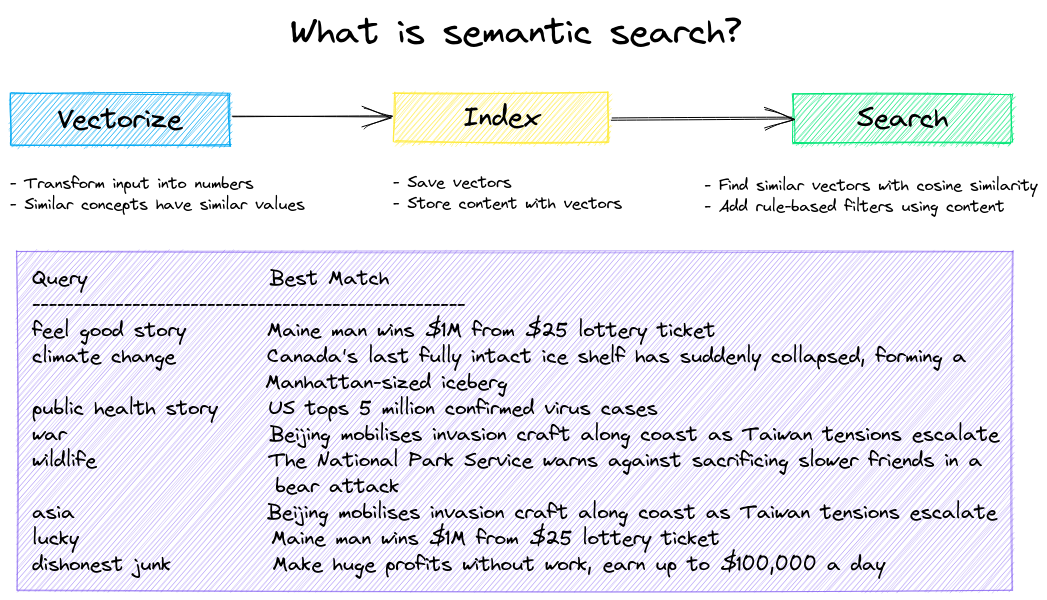
Build semantic/similarity/vector/neural search applications.

Traditional search systems use keywords to find data. Semantic search has an understanding of natural language and identifies results that have the same meaning, not necessarily the same keywords.
Get started with the following examples.
| Notebook | Description | |
|---|---|---|
| Introducing txtai ▶️ | Overview of the functionality provided by txtai | <img src="https://colab.research.google.com/assets/colab-badge.svg" alt="Open In Colab" class="ra0-md-img" loading="lazy" /> |
| Similarity search with images | Embed images and text into the same space for search | <img src="https://colab.research.google.com/assets/colab-badge.svg" alt="Open In Colab" class="ra0-md-img" loading="lazy" /> |
| Build a QA database | Question matching with semantic search | <img src="https://colab.research.google.com/assets/colab-badge.svg" alt="Open In Colab" class="ra0-md-img" loading="lazy" /> |
| Semantic Graphs | Explore topics, data connectivity and run network analysis | <img src="https://colab.research.google.com/assets/colab-badge.svg" alt="Open In Colab" class="ra0-md-img" loading="lazy" /> |
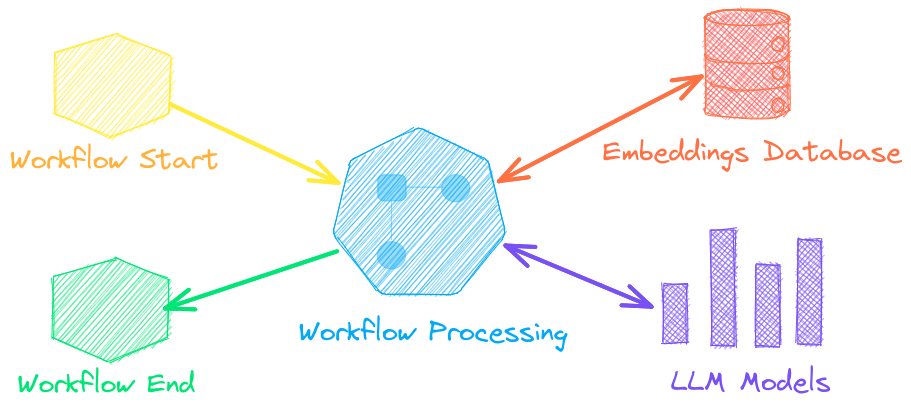
Autonomous agents, retrieval augmented generation (RAG), chat with your data, pipelines and workflows that interface with large language models (LLMs).
See below to learn more.
| Notebook | Description | |
|---|---|---|
| Prompt templates and task chains | Build model prompts and connect tasks together with workflows | <img src="https://colab.research.google.com/assets/colab-badge.svg" alt="Open In Colab" class="ra0-md-img" loading="lazy" /> |
| Integrate LLM frameworks | Integrate llama.cpp, LiteLLM and custom generation frameworks | <img src="https://colab.research.google.com/assets/colab-badge.svg" alt="Open In Colab" class="ra0-md-img" loading="lazy" /> |
| Build knowledge graphs with LLMs | Build knowledge graphs with LLM-driven entity extraction | <img src="https://colab.research.google.com/assets/colab-badge.svg" alt="Open In Colab" class="ra0-md-img" loading="lazy" /> |
| Parsing the stars with txtai | Explore an astronomical knowledge graph of known stars, planets, galaxies | <img src="https://colab.research.google.com/assets/colab-badge.svg" alt="Open In Colab" class="ra0-md-img" loading="lazy" /> |
Agents connect embeddings, pipelines, workflows and other agents together to autonomously solve complex problems.
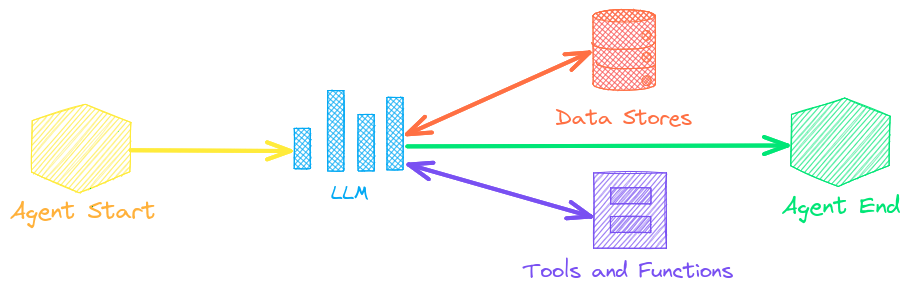
txtai agents are built on top of the smolagents framework. This supports all LLMs txtai supports (Hugging Face, llama.cpp, OpenAI / Claude / AWS Bedrock via LiteLLM). Agent prompting with <code class="ra0-md-code">agents.md</code> and <code class="ra0-md-code">skill.md</code> are also supported.
Check out this Agent Quickstart Example. Additional examples are listed below.
| Notebook | Description | |
|---|---|---|
| Granting autonomy to agents | Agents that iteratively solve problems as they see fit | <img src="https://colab.research.google.com/assets/colab-badge.svg" alt="Open In Colab" class="ra0-md-img" loading="lazy" /> |
| TxtAI got skills | Integrate skill.md files with your agent | <img src="https://colab.research.google.com/assets/colab-badge.svg" alt="Open In Colab" class="ra0-md-img" loading="lazy" /> |
| Agent Tools ▶️ | Learn about the txtai agent toolkit | <img src="https://colab.research.google.com/assets/colab-badge.svg" alt="Open In Colab" class="ra0-md-img" loading="lazy" /> |
| Analyzing LinkedIn Company Posts with Graphs and Agents | Exploring how to improve social media engagement with AI | <img src="https://colab.research.google.com/assets/colab-badge.svg" alt="Open In Colab" class="ra0-md-img" loading="lazy" /> |
Retrieval augmented generation (RAG) reduces the risk of LLM hallucinations by constraining the output with a knowledge base as context. RAG is commonly used to "chat with your data".


Check out this RAG Quickstart Example. Additional examples are listed below.
| Notebook | Description | |
|---|---|---|
| Build RAG pipelines with txtai ▶️ | Guide on retrieval augmented generation including how to create citations | <img src="https://colab.research.google.com/assets/colab-badge.svg" alt="Open In Colab" class="ra0-md-img" loading="lazy" /> |
| RAG is more than Vector Search | Context retrieval via Web, SQL and other sources | <img src="https://colab.research.google.com/assets/colab-badge.svg" alt="Open In Colab" class="ra0-md-img" loading="lazy" /> |
| GraphRAG with Wikipedia and GPT OSS | Deep graph search powered RAG | <img src="https://colab.research.google.com/assets/colab-badge.svg" alt="Open In Colab" class="ra0-md-img" loading="lazy" /> |
| Speech to Speech RAG ▶️ | Full cycle speech to speech workflow with RAG | <img src="https://colab.research.google.com/assets/colab-badge.svg" alt="Open In Colab" class="ra0-md-img" loading="lazy" /> |
Language model workflows, also known as semantic workflows, connect language models together to build intelligent applications.
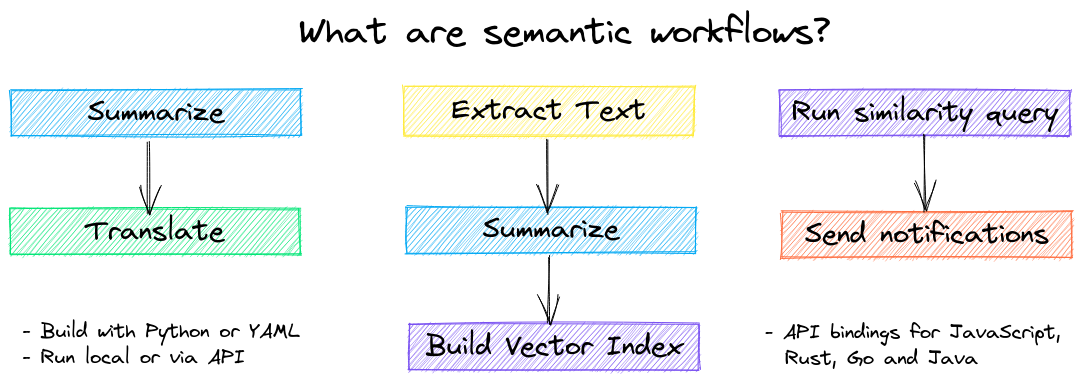
While LLMs are powerful, there are plenty of smaller, more specialized models that work better and faster for specific tasks. This includes models for extractive question-answering, automatic summarization, text-to-speech, transcription and translation.
Check out this Workflow Quickstart Example. Additional examples are listed below.
| Notebook | Description | |
|---|---|---|
| Run pipeline workflows ▶️ | Simple yet powerful constructs to efficiently process data | <img src="https://colab.research.google.com/assets/colab-badge.svg" alt="Open In Colab" class="ra0-md-img" loading="lazy" /> |
| Building abstractive text summaries | Run abstractive text summarization | <img src="https://colab.research.google.com/assets/colab-badge.svg" alt="Open In Colab" class="ra0-md-img" loading="lazy" /> |
| Transcribe audio to text | Convert audio files to text | <img src="https://colab.research.google.com/assets/colab-badge.svg" alt="Open In Colab" class="ra0-md-img" loading="lazy" /> |
| Translate text between languages | Streamline machine translation and language detection | <img src="https://colab.research.google.com/assets/colab-badge.svg" alt="Open In Colab" class="ra0-md-img" loading="lazy" /> |


The easiest way to install is via pip and PyPI
pip install txtaiPython 3.10+ is supported. Using a Python virtual environment is recommended.
See the detailed install instructions for more information covering optional dependencies, environment specific prerequisites, installing from source, conda support, lightweight minimal installation and how to run with containers.
Model guide
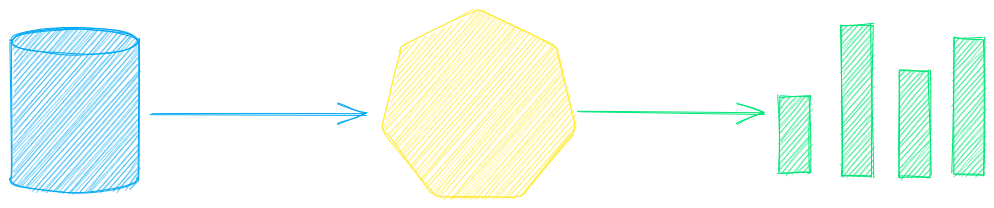
See the table below for the current recommended models. These models all allow commercial use and offer a blend of speed and performance.
Models can be loaded as either a path from the Hugging Face Hub or a local directory. Model paths are optional, defaults are loaded when not specified. For tasks with no recommended model, txtai uses the default models as shown in the Hugging Face Tasks guide.
See the following links to learn more.
Powered by txtai
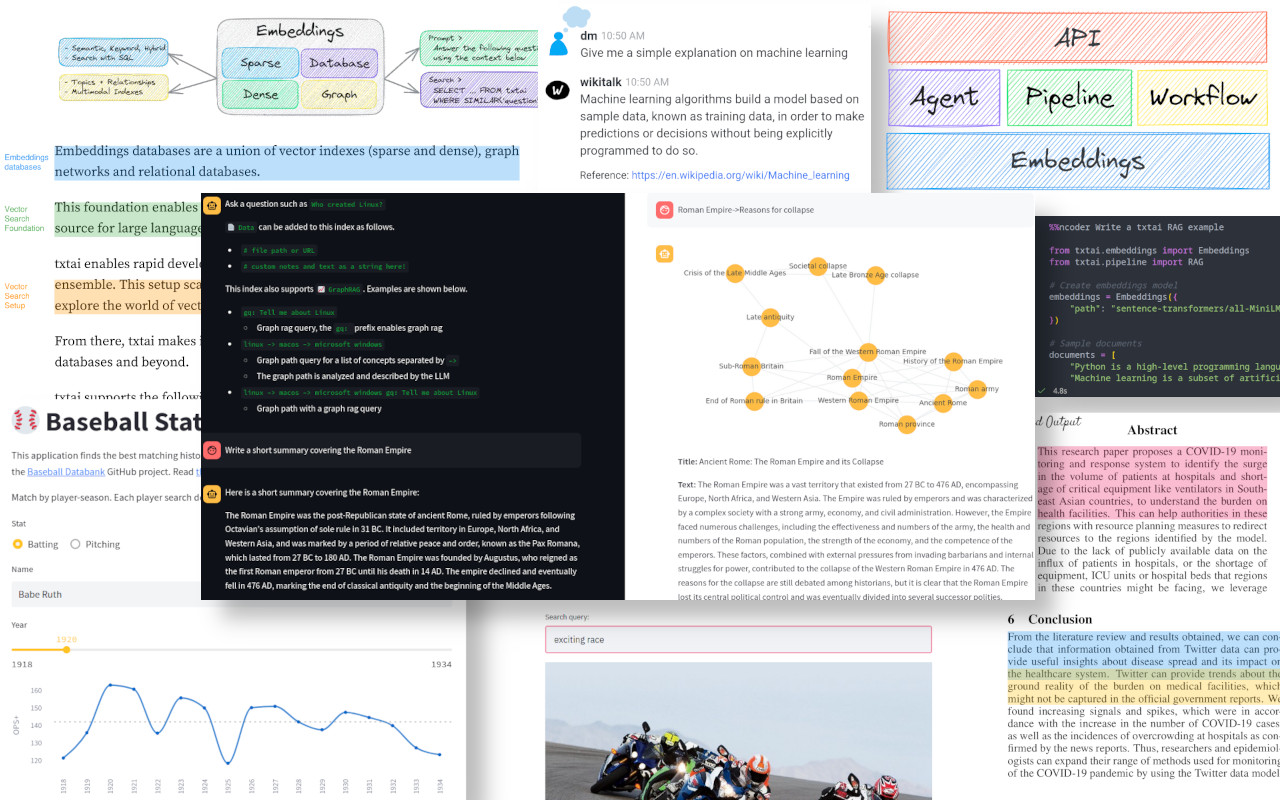
The following applications are powered by txtai.
| Application | Description |
|---|---|
| rag | Retrieval Augmented Generation (RAG) application |
| ncoder | Open-Source AI coding agent |
| paperai | AI for medical and scientific papers |
| annotateai | Automatically annotate papers with LLMs |
In addition to this list, there are also many other open-source projects, published research and closed proprietary/commercial projects that have built on txtai in production.
Further Reading


- Introducing txtai, the all-in-one AI framework
- txtai: An All-in-One AI Framework for Semantic Search and LLM Workflows
- Tutorial series on Hashnode | dev.to
- What's new in txtai 9.0 | 8.0 | 7.0 | 6.0 | 5.0 | 4.0
- Getting started with semantic search | workflows | rag
- Running txtai at scale
- Vector search & RAG Landscape: A review with txtai
Documentation
Full documentation on txtai including configuration settings for embeddings, pipelines, workflows, API and a FAQ with common questions/issues is available.
Contributing
For those who would like to contribute to txtai, please see this guide.


